TARK SMS OTP Opt-In Workflow (OTP Only)
This page documents the user consent flow for SMS OTP login verification in the TARK mobile app.
Step-by-step flow
- User chooses Phone OTP (SMS) or Email OTP.
- User enters phone number.
- User taps "Continue / Send code" (consent moment).
- App sends OTP via SMS for login verification only.
Required disclosure text
By tapping Continue, you agree to receive SMS verification codes from TARK.
- Message frequency varies.
- Message & data rates may apply.
- Reply STOP to opt out, HELP for help.
- Privacy: https://playtark.com/privacy
- Terms: https://playtark.com/terms
- Prefer not to use SMS? Use Email OTP.
This flow is OTP-only for authentication and account verification. It is not promotional messaging.
Hosted Mock Screenshot
Screenshot of the phone-entry consent screen used in-app for SMS OTP opt-in proof.
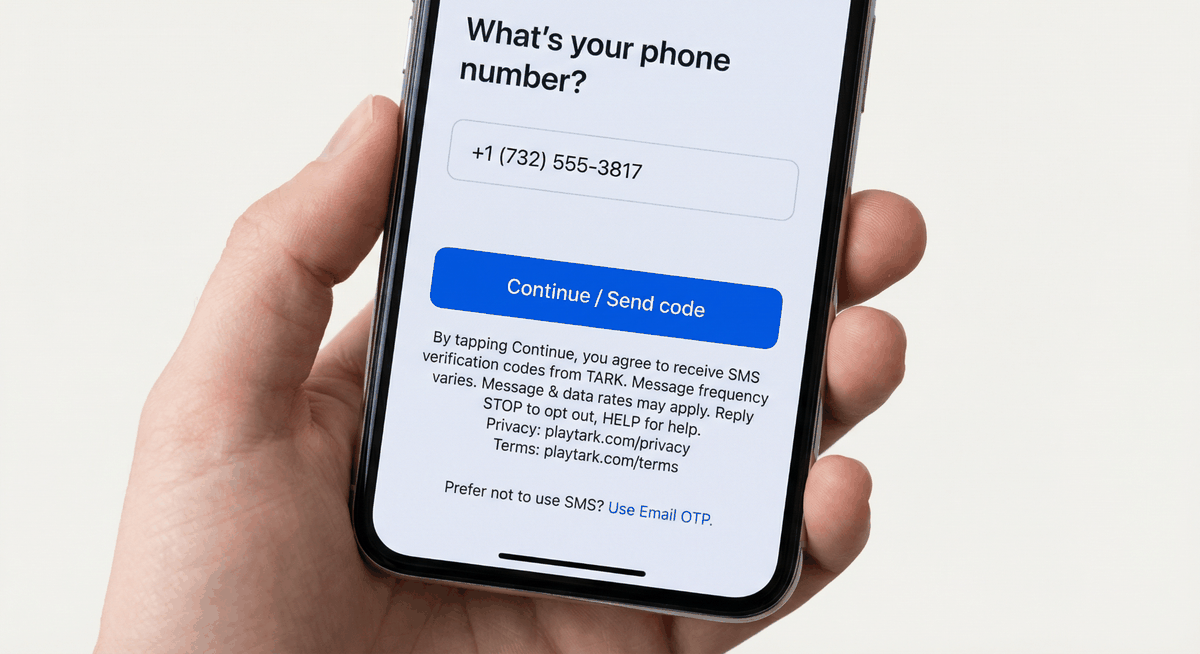
Screenshot is temporarily unavailable. Please refresh and retry.
Open full-size image
Tip: use browser zoom for close review.
In-page visual proof (HTML/CSS mock)
This mock is included so this page alone is sufficient proof even before the PNG is uploaded.
What's your phone number?
+1 (732) 555-3817
By tapping Continue, you agree to receive SMS verification codes from TARK.
Message frequency varies. Message & data rates may apply.
Reply STOP to opt out, HELP for help.
Privacy: playtark.com/privacy Terms: playtark.com/terms
Prefer not to use SMS? Use Email OTP.